AI Automation 101: Where to Start If You've Never Automated Anything

You've read the articles. You've seen the stats. You know automation is supposed to save time and money and make everything better. And you're still doing everything manually.
That's fine. Honestly, you've got plenty of company. AI adoption among small businesses nearly doubled in 18 months, jumping from 26% in 2023 to about 51% by 2024, according to BigSur.ai research. But adoption doesn't mean mastery. Only 31% of businesses have fully automated even one function, per McKinsey's 2024 data. And 82% of organizations still use paper-based, manual routing of tasks backed by Excel, according to Forrester. Most businesses that "use automation" are doing one small thing and handling everything else by hand.
The problem isn't that you don't believe automation works. It's that every guide you've read assumes you already know what a "trigger" is, what "Zap" means, or why something called "Make" has nothing to do with crafting.
So let's start from actual zero.
First, What Are We Actually Talking About?
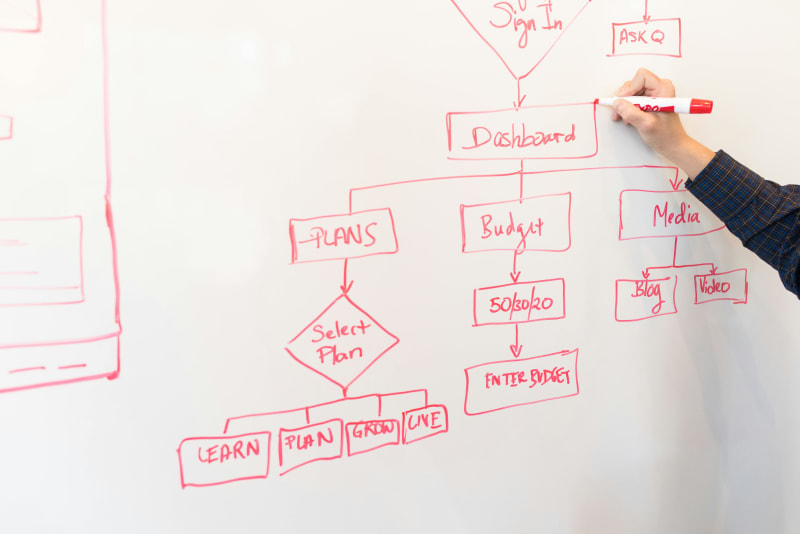
AI automation is software that does repetitive tasks for you. That's it. Not robots. Not science fiction. Just software that watches for something to happen and then does the next step automatically.
Here's a non-technical example: A customer fills out your contact form. Right now, you get an email, read it, open your CRM, type their info in, then send them a "thanks for reaching out" reply. That's four steps you do manually every single time.
With automation: customer fills out form, their info goes into your CRM automatically, and the thank-you email sends itself. Same result. Zero effort from you.
The "AI" part adds a layer of intelligence. Instead of just following rigid rules, AI automation can read an email, understand what the customer is asking, and route it to the right person. It can look at an invoice and categorize it correctly even if the format is different from the last one. It handles the messy, not-perfectly-standardized stuff that regular automation chokes on.
How to Know You're Ready (You Probably Already Are)
Here's a quick gut check. If any of these sound familiar, you're ready:
- You do the same task more than 3 times a week
- You've ever said "I should really set up a system for this"
- You're copying data from one app to another by hand
- You forget to follow up with leads because there are too many
- You spend Sunday nights scheduling social media posts for the week
- Your bookkeeper spends hours categorizing the same types of transactions
You don't need to be a tech company. You don't need an IT department. A bakery owner who spends two hours a day answering the same five questions about catering orders is just as ready as a SaaS startup. And here's a stat that might surprise you: the average SMB now uses 58 different applications, according to Okta's SMBs at Work Report. If you're manually bridging even a few of those, you're burning hours every week on work software could handle.
McKinsey found that 57% of U.S. work hours are now technically automatable with current technology, according to their November 2025 report. Workers currently spend an average of 4.5 hours per week on tasks that could already be automated, per ServiceNow research. You don't need to automate all of them. You just need to start with one.
The "Pick One Thing" Rule
I'm going to save you from the mistake that kills most automation projects before they start.
Don't try to automate your whole business. Don't even try to automate two things. Pick one. Just one.
Here's why: Ernst & Young found that 30 to 50% of RPA projects fail. And the biggest reason isn't bad tools or bad technology. It's scope creep. Businesses that try to automate everything at once have an 85% failure rate. Businesses that start with a single process? 85% success rate. Those numbers are almost perfectly inverted.
So which one thing should you pick? The one that makes somebody on your team groan every Monday morning.
Not the most "strategic" one. Not the most impressive one. The one that's eating time, creating errors, and making people dread their week. That's where adoption happens naturally because the person doing it actually wants it automated.
For most businesses, the first automation falls into one of these categories:
| Category | Example | Typical Time Saved |
|---|---|---|
| Email follow-ups | Auto-send a reply when someone fills out your contact form | 3-5 hours/week |
| Appointment reminders | Auto-text customers 24 hours before their appointment | 2-3 hours/week |
| Social media scheduling | Batch and schedule a week of posts in one sitting | 6-9 hours/week |
| Invoice sending | Auto-generate and send invoices when a job is marked complete | 3-5 hours/week |
| Lead notifications | Get a Slack/text alert the moment a new lead comes in | Faster response, more sales |
Still answering the same customer questions over and over? ReviewReply automates review responses and customer communications for $99, and it takes about 10 minutes to set up.
Your First Automation: Step by Step
Let me back up for a second. I realize I should walk through what this actually looks like in practice, not just in theory.
Step 1: Write down the manual process.
Literally write it out. "When X happens, I do Y, then Z." For example: "When someone books a consultation on my website, I check my email, open Google Calendar, create an event, then send them a confirmation email with directions to my office."
Step 2: Identify the trigger and the action.
The trigger is what starts the process. The action is what should happen automatically. In the example above: trigger = new booking; actions = create calendar event + send confirmation email.
Step 3: Pick a tool (start free).
You don't need to spend money on your first automation. Here's what's free:
| Tool | Free Plan | What It Does |
|---|---|---|
| Zapier | 100 tasks/month, single-step Zaps | Connects 7,000+ apps with if-this-then-that logic |
| Make.com | 1,000 operations/month | Visual workflow builder, more complex flows than Zapier |
| HubSpot CRM | Unlimited contacts | Free CRM with basic email automation |
| Calendly | 1 event type | Scheduling with automatic calendar sync |
| Buffer | 3 social channels | Social media scheduling |
| Mailchimp | 500 contacts | Email marketing automation |
Zapier is where most beginners start, and for good reason. It's the easiest to understand. You pick a trigger app ("When I get a new Google Form response..."), pick an action app ("...create a row in Google Sheets"), and you're done. Your first Zap takes about 15 minutes.
Step 4: Test it with real data.
Don't just set it and forget it. Run the automation with a test case. Fill out your own contact form. Book a fake appointment. Send yourself a test invoice. Make sure it actually works the way you expect before real customers hit it.
Step 5: Measure the before and after.
This is the step everyone skips, and it's the most important one. Before you turn on the automation, write down how long the manual process takes you per week. After a month, check how much time you're saving. If you can't say "this saves me X hours per week," you're guessing. We covered how to measure this properly in our automation ROI guide.
What It Actually Costs (Less Than You Think)
Here's the thing most automation articles won't tell you: you can automate meaningful parts of your business for the cost of a nice lunch.
Zapier's free plan handles 100 tasks per month with single-step Zaps (one trigger, one action). If your contact form gets 3 submissions a day, that's about 90 tasks a month. Covered. When you outgrow the free plan, Zapier Professional is $29.99/month for 750 tasks and multi-step workflows.
Make.com's free plan is even more generous: 1,000 operations per month. For small businesses, that's often enough to run two or three automations without paying anything.
The real cost isn't the tool. It's the setup time. Your first automation takes 30 minutes to an hour because you're learning the interface. Your second one takes 15 minutes. By your third, you know exactly what you're doing.
Here's a realistic budget breakdown for a small business getting started:
| Month | Spending | What You're Running |
|---|---|---|
| Month 1 | $0 | 1 automation on Zapier or Make free plan |
| Month 2 | $0-20 | 2-3 automations, maybe outgrow free tier |
| Month 3 | $20-50 | 3-5 automations on a starter paid plan |
| Month 6 | $50-150 | Full workflow automation across multiple areas |
Compare that to hiring someone to do the manual work. At $20/hour for even 10 hours per week of admin tasks, you're spending $800/month on labor. A $50/month automation tool that handles half of that is a 8x return. And here's some perspective: what used to require $10,000+ in custom development now costs under $100/month through platforms like Zapier and Make.com, according to CommunityForce research.
The numbers back it up at scale too. A 2025 Salesforce SMB Trends Report found that 58% of small businesses using AI save more than 20 hours per month, with median annual savings around $7,500.
Spending hours every week on bookkeeping and transaction categorization? BookBot automates the whole process for $199 and saves most businesses 15 to 20 hours per month.
The Five Automations Every Small Business Should Have

Once you've got your first automation running and you're feeling confident, here's the order I'd tackle the rest. This isn't random. It's sequenced by how fast each one pays back.
1. Customer response automation (Week 1)
Auto-respond to contact form submissions, review replies, and common questions. This is the single fastest win because speed matters: 78% of customers buy from the company that responds first, according to Lead Connect research. An auto-reply that goes out in 30 seconds beats a manual reply that goes out in 4 hours, every time.
2. Appointment and reminder automation (Week 2)
If your business involves scheduling (consultations, appointments, service calls), automate the reminders. Automated reminders can reduce no-shows by up to 26%, according to LLCBuddy's 2025 appointment statistics, with some providers reporting even higher reductions. That's recovered revenue from appointments that would have been empty.
3. Social media scheduling (Week 3)
Stop posting manually. Batch a week's worth of content in one sitting, schedule it, and move on. Tools like Buffer and Later have free plans. The time savings are immediate: 6 to 9 hours per week for most businesses that were posting manually.
4. Invoice and payment follow-ups (Month 2)
Auto-send invoices when work is completed. Auto-send reminders when payment is overdue. Businesses automating invoicing see payments come in 11 days faster on average because the invoice goes out immediately instead of whenever you remember to send it.
5. Lead capture and CRM entry (Month 2-3)
When a lead comes in from any channel (website, social media, referral), automatically add them to your CRM with their source tagged. No more lost leads because someone forgot to write down a phone number. We've got a full breakdown of what to automate first if you want the complete priority list.
Mistakes That'll Waste Your Time (and Money)
Let me be honest about what goes wrong, because I'd rather you avoid these than learn them the hard way.
Buying a $200/month tool before testing free options. I've seen business owners sign annual contracts for platforms they end up using for two of the forty features. Start with Zapier's free plan. Learn what automation actually does for your workflow. Then upgrade when you know exactly what you need.
Automating a broken process. If your expense reporting takes 14 steps manually, automating all 14 steps doesn't fix anything. It just makes a bad process run faster. Fix the process first, then automate. Cut those 14 steps to 5, then automate the 5.
Not telling your team. Nothing kills adoption faster than surprising employees with automation. "The system will handle that now" sounds an awful lot like "you're being replaced" if you don't explain what's actually happening. Tell your team before, not after.
Expecting perfection on day one. Your first automation will probably break once or twice. That's normal. Months 1 to 3 of any new automation might actually feel slower while your team adjusts. The payback starts in month 2 or 3 for simple automations, month 4 to 6 for complex ones. Don't panic and cancel during the dip.
Skipping the measurement. If you can't tell me how many hours your automation saved this month, it's not working. About 70% of automation projects fail to meet their objectives, according to CodeMoly's 2024 analysis, and a big chunk of those failures come from never defining what "success" looks like. Track time from day one. Not "I feel like it saves time." Actual hours. Write them down.
When to Move Beyond DIY
There's a point where free tools and Zapier workflows hit a ceiling. Here's how to know you've reached it:
- You have more than 10 automations running and managing them is becoming a job itself
- You need automations that talk to each other (not just isolated workflows)
- Your processes involve judgment calls that simple if/then rules can't handle
- You're spending more time maintaining automations than they're saving you
That's when it makes sense to look at purpose-built AI tools designed for specific functions. Instead of duct-taping five Zapier workflows together to handle invoicing, you use a tool built specifically for automated bookkeeping. Instead of a chain of email templates and CRM triggers for hiring, you use a tool designed for recruiting automation.
We wrote a full guide to choosing the right AI tools by business size if you're at that stage. And if you want the recommended adoption sequence, our AI starter kit guide lays out exactly which tools to get first, second, and third.
Need to automate hiring beyond what Zapier can handle? HireHelper manages the full pipeline from resume screening to interview scheduling for $149.
The 30-Day Challenge
Here's what I'd actually do if I were starting from zero today.
Week 1: Pick your most annoying repetitive task. Write out the manual steps. Sign up for Zapier's free plan. Build one automation. Time yourself doing the task manually beforehand so you have a baseline.
Week 2: Let it run. Check the results. Fix anything that broke. Write down how much time it saved.
Week 3: Pick your second task. Build the automation. You'll be faster this time because you already know the tool.
Week 4: Review your two automations. Calculate the total time saved. Decide whether to add a third or upgrade your existing ones.
By the end of the month, you'll have a clear answer to "is this worth it?" based on real numbers from your actual business. Not someone else's case study. Yours.
And honestly? For most businesses, the answer is obvious by week two. That thing you were spending three hours on every week? It takes zero hours now. It's hard to argue with that.
If you're not sure where the biggest time sinks are in your business, our guide to the hidden costs of staying manual breaks down exactly where the money and time are going.
Ready to stop doing everything manually? Automiva builds AI tools that help small businesses cut the repetitive work, whether you're just getting started or ready to automate across departments.